
Enterprise Systems · Engineering & energy services
Service Hub
One system that turns machine running hours into service due dates, then sets them against parts, jobs, invoices, cash and engineers’ certificates.
Command centre: what needs a decision today. Select the screenshot to enlarge it.
The business problem
Businesses that look after engines and compressors often track running hours, parts stock, quotes, invoices and staff certificates in separate spreadsheets and tools. No one sees in one place that a service is overdue with no job raised, that a part will arrive after it is needed, or that an engineer’s certificate lapses before a job ends.
The solution delivered
A working web application built around a fictional engine-service company. Average running hours become due dates, each service is matched to open jobs, and its parts kit is set against stock and supplier lead times. Jobs move from enquiry to invoice, cash is projected from how each client usually pays, and every assignment is checked against the certificates a site requires. Twelve data-quality rules report errors without ever editing a record.
Main features
What it does.
Command centre
Headline numbers and a ranked list of what needs a decision today, drawn from every area.
Hours become due dates
Average running hours and calendar limits are projected into service dates. The earlier one governs.
Parts against the plan
Coming services are set against stock and orders, with the latest date to order each part.
Enquiry to invoice
Quotes and jobs move through stages, and reaching Invoiced raises the invoice at the client’s terms.
Finance view
Ageing, clients ranked by overdue money, margin by business line and an eight-week cash projection.
Certificate checks
Assignments are tested against site requirements and the person’s other bookings.
Client view
What one client would see: their machines, what is due, their jobs and invoices.
Excel exports
Service plan, parts plan, receivables, roster and findings download as formatted workbooks.
Screenshots
Inside the application.
Genuine screens from the working application. Select a desktop screenshot to enlarge it.
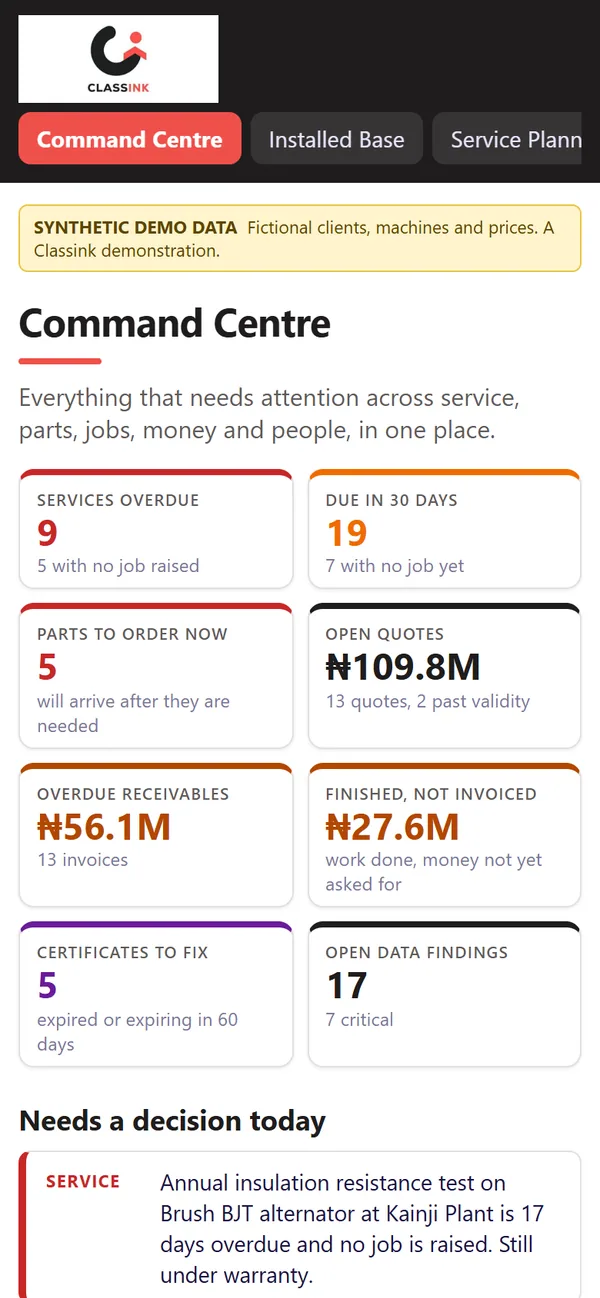
On a phone
Built to work on small screens too.
The same application adapts to a phone, so the people who need it can use it away from a desk.
Technologies
- Python
- Flask
- pandas
- openpyxl
- Plotly
- pytest (67 automated tests)
Listed from the project's own dependencies and tests.
Classink's contribution
Designed and built end to end by Classink: the data model, the service-forecasting, stock and finance logic, the web application, the Excel exports and the automated tests.
This is an internal Classink demonstration, not a paying client engagement. It runs on fictional, synthetic data, which the application states on every screen.
Business enquiry
Need something like Service Hub?
Tell us what you want to achieve. We will start with the problem, then scope what a solution could look like for your organisation.
Or write to classinkdigital@outlook.com